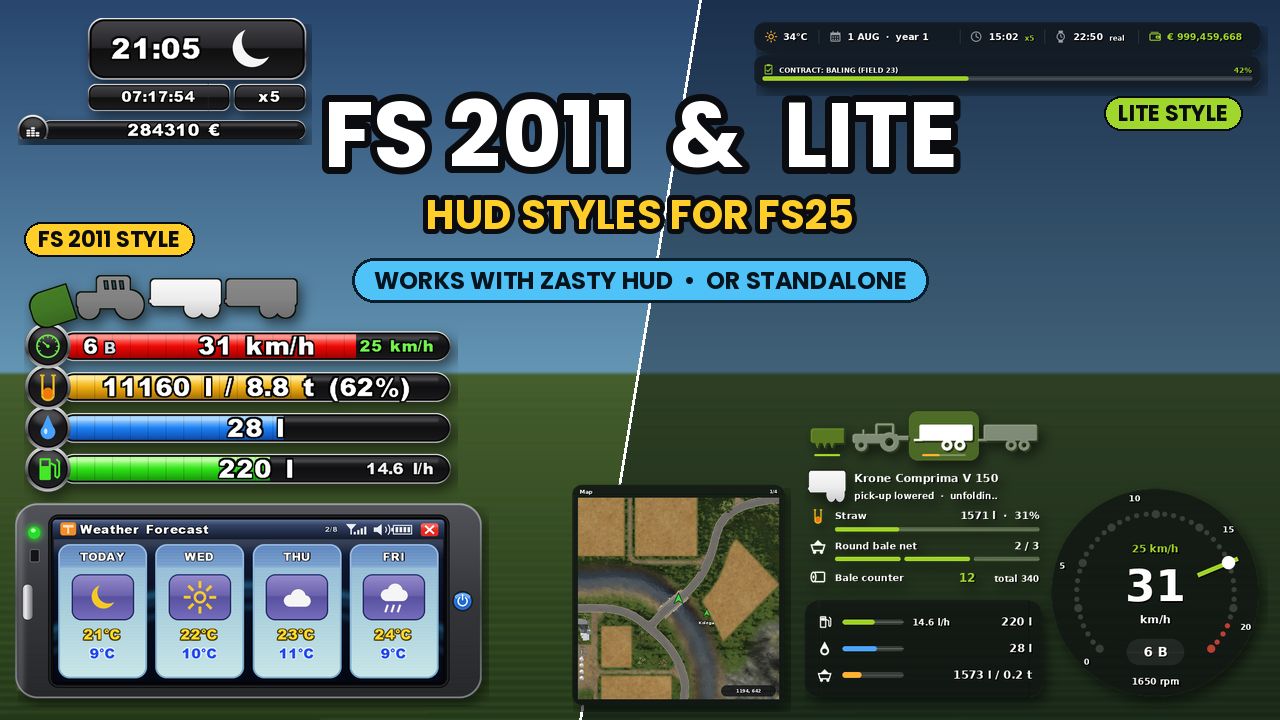
FS 2011 & Lite HUD
Two HUD styles for Farming Simulator 25, usable standalone or together with Zasty HUD.
Choose between a classic Farming Simulator 2011-style HUD or a modern minimal Lite HUD.
With Zasty HUD installed, both styles appear alongside Bar and Round. Without it, press Left Alt + H to open the standalone settings.
FS 2011 Style
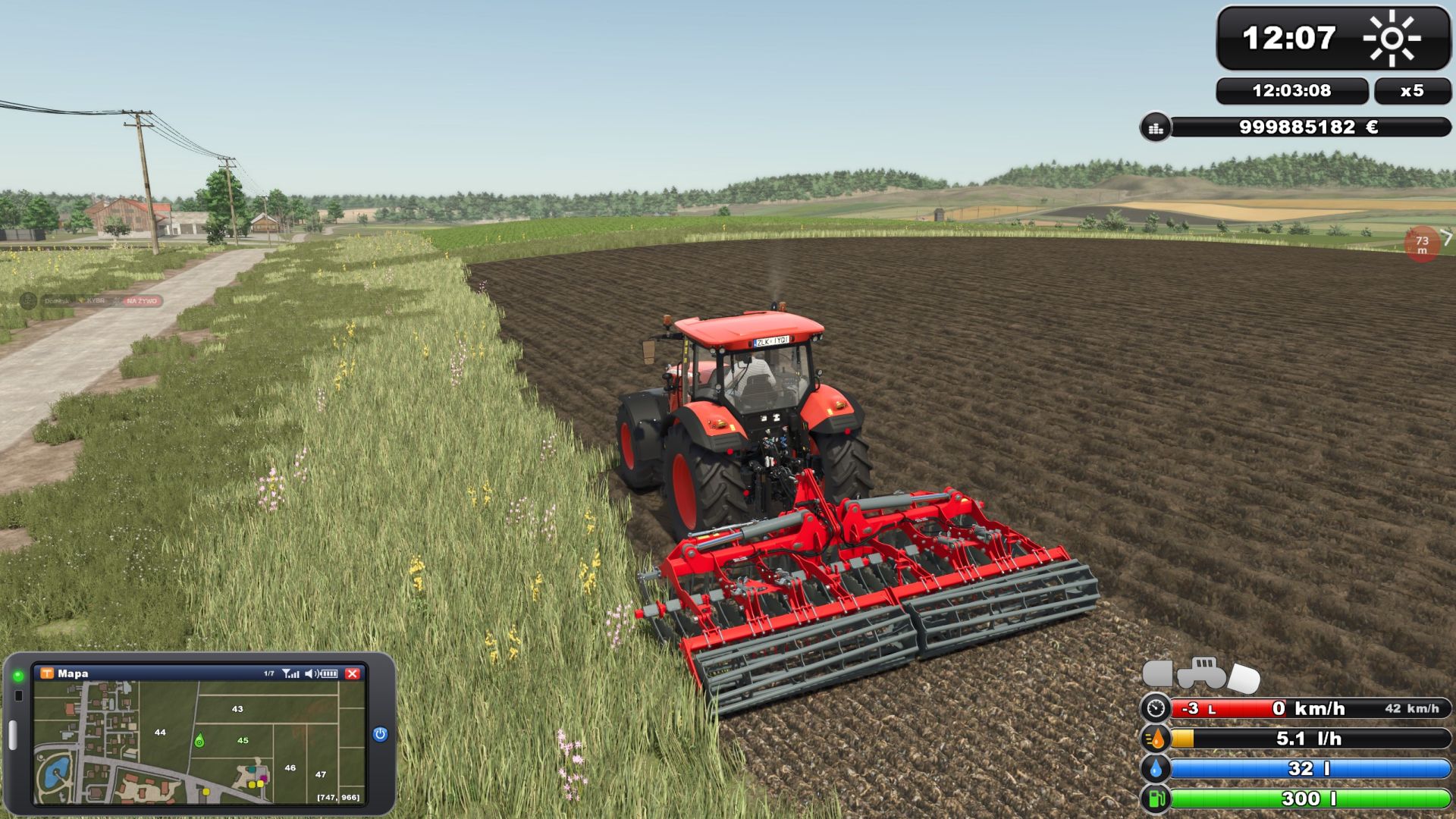
Fully replaces the standard FS25 HUD.
Bottom-right bars
– Classic FS 2011-style speed, fill, AdBlue and fuel bars
– RPM shown through the speed bar
– Gear, gear group and cruise-control speed
– Trailer/implement fill level in litres and tonnes
– Fuel consumption in l/h
– AdBlue/DEF support
– Vehicle and implement schema with selected, active and lowered states
Clock
– FS 2011-style clock
– Weather icon
– Real computer time
– Time scale
– Farm balance
– Contract progress bars
PDA
Replaces the normal minimap.
Press 9 or Left Alt + I to switch between:
– Map
– Weather Forecast
– Prices
– Statistics
– Players
– Vehicles
– Engine
– Tyres
– Farm
The map includes coordinates, field numbers, owned fields, vehicles and standard game icons.
PDA size can be adjusted from 40 to 100%.
F1 Help
Uses a single FS 2011-style help box showing the key and corresponding action.
Lite Style
A cleaner modern HUD designed to keep only important driving information.
Vehicle schema
– Vehicle and attached implements
– Selected and active equipment states
– Raised/lowered status
– Fold progress
– Selected implement name and status
Tachometer
Two selectable modes:
Analog:
– Round RPM gauge
– Speed
– Gear
– Cruise speed
– RPM
Digital:
– Large speed display
– Gear
– RPM segment bar
Also displays:
– Fuel
– AdBlue
– Fill level
– Weight
– Fuel consumption
Lite Map
Square map panel with:
– Heading
– Coordinates
– Field numbers
– Vehicles
– Workers
– Contracts
– Selling points
– Productions
– Animals
– Multiplayer player markers
Press 9 to switch between Map, Vehicles, Engine and Tyres.
Use [ and ] to change map views:
– Crop types
– Growth
– Soil
– Farmlands
Map size and zoom from x0.5 to x3 can be adjusted live.
Customization
Lite HUD colors can be customized individually for:
– Panels
– Tiles
– Bar backgrounds
– Text
– Small text
– Accent
– High RPM/load
– Reserve/red zone
– AdBlue
Each setting offers multiple colors and opacity controls.
Both Styles
– Central unloading prompt when unloading becomes available
– Variable Tire Pressure integration
– Game units and currency are respected
– HUD size follows Zasty HUD settings when installed
Languages
EN, DE, PL, FR, ES, IT, PT/BR, CZ, RU, NL, HU and TR.
The addon also improves Zasty HUD language support without modifying its files.
Requirements
None.
Zasty HUD is optional.
Installation
1. Place FS25_ZastyHUD_FS2011.zip in your mods folder.
2. Activate it in your savegame.
3. Press Left Alt + H.
4. Select FS 2011 or Lite.
5. Use 9 or Left Alt + I to switch screens.
6. Use [ and ] to change map views.
Compatibility
– Client-side only
– Single player and multiplayer
– Other HUD mods may overlap
– Removing this addon leaves Zasty HUD unchanged
V1.9.3.0
– Fixed: FS 2011 colours were loaded wrongly after a restart (black texts, the settings tab could not open)
– Weather forecast reads the right days (today + 3) and shows the game’s weather types (sun, partly cloudy, cloudy, rain, snow, hail, thunder)
– Implement pictures in the Lite schema face the right way again (only the tractor picture is mirrored)
– Lite schema turned the right way, constant picture size, no second line under the selected implement, shop picture of the selected machine
– F1 help moves right when the Lite top bar is on the left
– Condition bar on the tablet’s Vehicles screen
– More FS 2011 options and colours; one settings section per style
– Original FS 2011 font quality
Required mods:
Zasty HUD